AI Influencer How to create an AI influencer
How to Create an AI Influencer: The Complete Step-by-Step Guide
Eight steps that take you from an empty account to a persona people follow and brands pay. Each step shows how long it takes, what it costs, and the mistakes that make most new AI influencers fail.
Key takeaways
- The hard part is not the image. It is keeping one face identical across hundreds of posts.
- Lock the face with a character reference (fast) or a custom LoRA model (most control) before you post anything.
- Video grows the account. Photos keep it looking good. Aim for at least half video once you are set up.
- Label the account as AI. Meta, TikTok and the EU AI Act all expect it.
- A lean setup costs about $20–$60 a month. Your real cost is time.
The process
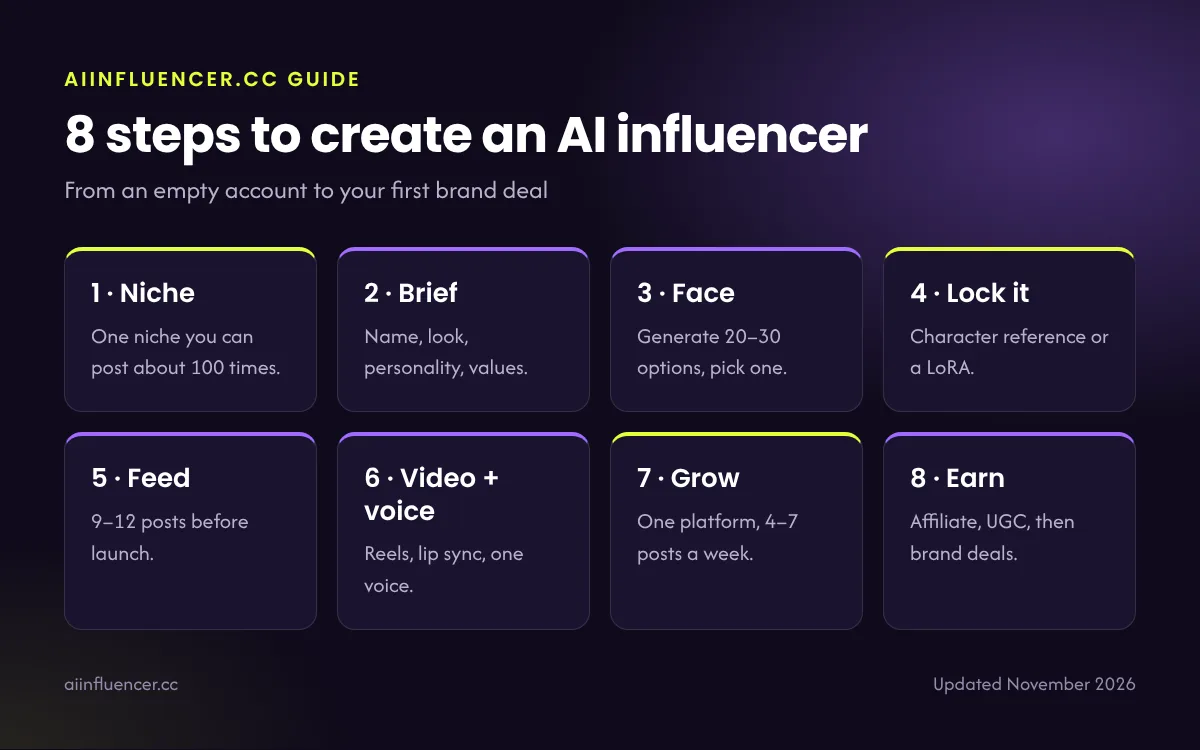
8 steps to create an AI influencer
Follow them in order. Skipping steps 2 and 4 is the most common reason accounts stall.
1
Pick a niche you can post about 100 times
Choose one niche with brands that already pay creators and content you can make convincingly with AI. Fashion, fitness, travel, gaming and tech, and AI tools education are the usual picks. Our niche comparison rates each one on brand demand and how hard it is to fake well, and our 12 niche ideas go deeper.
Test it: write 20 post ideas in ten minutes. If you run out at eight, the niche is too narrow for you.
2
Write a one-page character brief
Followers follow a person, not a picture. The brief is what makes your persona feel like someone. Fill in every row of this table before you open an image tool:
| Field | Example |
|---|---|
| Name, age, city | Mara Lin, 27, Lisbon |
| Niche and angle | Budget travel for solo women |
| Look (visual signature) | Short silver bob, round glasses, always one yellow item |
| Personality | Curious, dry humour, honest about bad trips |
| Beliefs | Slow travel beats ticking off cities |
| Never posts | Luxury hauls, fake giveaways, politics |
| Voice | Short sentences, first person, no emojis in captions |
The visual signature matters most. It has to be recognisable at thumbnail size on a busy feed.
3
Design the face
Generate 20–30 candidate faces from one detailed prompt. Describe face shape, skin, hair, age and lighting, and ask for a neutral studio portrait so nothing distracts from the face. Pick the one that matches your brief and still looks good small.
Avoid faces that look like a real celebrity or someone you know. Look-alikes create legal risk and get reported.
Tools: see our best AI image generators or, with no budget, the free options.
4
Lock the face so it never changes
This is the step that separates real accounts from random AI pictures. Re-typing the same prompt will not give you the same person. You need one of these three methods:
| Method | How it works | Consistency | Effort |
|---|---|---|---|
| Character reference | Upload your chosen face as a reference with each new image | Good | Low: works in most hosted tools |
| Custom LoRA model | Train a small model on 15–25 images of the face, then call it in every prompt | Best | Medium: needs a training service or a local setup |
| Face swap after generation | Generate the scene, then swap your persona’s face in | Good | Low, but edges and lighting can look off |
For a LoRA, build the training set from your chosen face: front, three-quarter and side angles, different expressions and lighting, plain backgrounds, and no other people in frame. Fifteen good images beat fifty mixed ones. Full walkthrough: how to keep an AI face consistent.
5
Build a starter feed of 9–12 posts
Before anyone sees the account, fill the grid. Mix close portraits with lifestyle scenes that show a life: the café, the gym, the street, holding a product in your niche.
Throw out any image with extra fingers, melted text, mismatched earrings or a face that looks slightly different. One bad image makes visitors doubt the whole account.
Keep a spreadsheet of the prompt, seed and settings for every image you publish. You will need it to recreate looks later. Our prompt library and realism guide help here.
6
Add short video and one consistent voice
Reels, TikTok and Shorts are shown to people who do not follow you yet, so video is where new followers come from. Use two kinds:
- Talking-head clips: your persona speaks to camera with lip sync. Tools like HeyGen are built for this. Read our HeyGen review.
- Motion clips: animate a still image into a walk, a turn or a gesture with an image-to-video model such as Veo, Kling or Runway.
Pick one voice and never change it. Changing the voice is as jarring as changing the face. Compare options in best AI video generators and read how to give your AI influencer a voice.
7
Launch on one platform and grow
Start on the one platform where your niche lives (guides: Instagram, TikTok), usually Instagram for fashion, beauty and travel, and TikTok for entertainment and gaming. Add a second platform only once the first is posting on autopilot.
- Post 4–7 times a week at consistent times.
- Turn on the platform’s AI label and write “AI-generated” in the bio.
- Reply to every comment in the first hour, in the persona’s voice.
- Collaborate with accounts of a similar size in nearby niches.
- Check which posts bring followers, not just likes, and make more of those.
8
Earn your first money
Start with affiliate links, which need no minimum audience. Then pitch small brands once you have steady engagement. A one-page media kit with niche, audience, engagement rate, best posts and rates is enough. See AI influencer brand deals.
UGC (content brands use in their own ads) pays for quality, not followers, so it is a good early income stream. See how AI influencers make money for all six streams.
Budget
What it costs and how long it takes
Three realistic setups. Prices change often, so check each tool’s pricing page.
| Setup | Tools | Monthly cost | Good for |
|---|---|---|---|
| Free | Free image tier or Stable Diffusion on your own PC, free editing app | $0 | Testing a persona and a niche |
| Lean | One paid image tool + one video or voice tool | ≈ $20–$60 | Posting daily with video |
| Pro | Image tool + LoRA training + video + voice + scheduler | ≈ $80–$200 | Several personas or client work |
Week 1
Niche, brief, face design and locking the face.
Weeks 2–4
Starter feed, first videos, launch, daily posting.
Months 2–6
Growth, affiliate income, first brand pitches. Many accounts take this long to earn steadily.
Avoid these
Mistakes that stop AI influencers growing
Don’t
- Post before the face is locked
- Copy a real person’s face or name
- Hide that the account is AI
- Post only portraits with no story
- Buy followers or engagement
- Change the voice or style every week
Do
- Write the brief first and stick to it
- Keep a prompt and seed log
- Label every realistic post
- Make at least half your posts video
- Answer comments as the persona
- Review what brings followers every week
FAQ
Frequently asked questions
How long does it take to create an AI influencer?
About a week to design and lock the persona and build a starter feed. Growing it to the point where brands pay usually takes two to six months of consistent posting.
Can I create an AI influencer for free?
Yes, to start. Use a free image tier or run Stable Diffusion on your own computer, and a free editing app. See our list of free AI image generators. Most creators upgrade one tool once the account shows it can grow.
What is the best way to keep the face consistent?
A custom LoRA model trained on 15–25 images of your chosen face gives the most consistent results. Character reference features in hosted tools are faster and good enough for many accounts.
Do I have to disclose that my influencer is AI?
In practice, yes. Meta and TikTok ask you to label realistic AI content, the EU AI Act requires disclosure of realistic synthetic content since August 2026, and paid posts must always be disclosed.
Which platform should I start on?
The one where your niche already lives. Instagram suits fashion, beauty and travel. TikTok suits entertainment, gaming and fast trends. Start with one and add a second later.
Can I make an AI influencer of myself?
Yes. Train a model on your own photos and, if you want, clone your own voice. Never use someone else’s face or voice without written permission.
Keep reading
Related guides
The complete AI influencer guide
What AI influencers are, how they earn, the tools and the rules, all on one page.
Best AI image generators
The image tools compared for realistic, consistent influencer photos.
What is a virtual influencer?
Where virtual influencers came from and how brands use them.
Pick your tools next
The right image generator makes step 4 much easier.